
Quiz Follow-Up for Coaches: The CRMX SCORE Route
Build a CRMX quiz follow-up workflow that turns one completed coaching assessment into a clear result, relevant next step, and owned conversation.
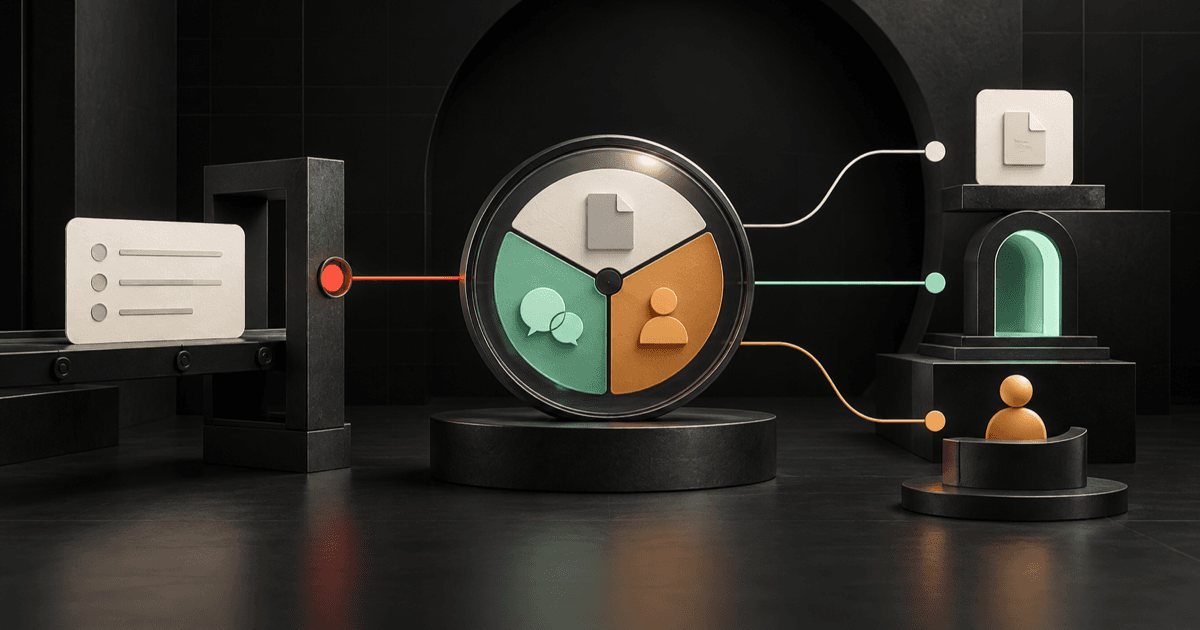
A useful coaching quiz should not end with a score and a generic sales email.
The practical tactic is to turn one completed assessment into one clear result, one approved explanation, and one relevant next step. CRMX can record the result, route the follow-up, and expose every live reply. A person keeps ownership of judgment, exceptions, and sensitive context.
That is the CRMX SCORE Route: Start from verified completion, Capture one trustworthy result, Offer one approved interpretation, Route one next step, and Exit on a live signal.
Brent Attaway's Five Fortune Engines connects useful lead capture, permission-based follow-up, clear next steps, and process-first automation. SCORE applies those principles to the moment after a prospect finishes a quiz. Give value before asking for time. Use automation for the repeatable handoff. Keep human judgment where it belongs.
The tactic: make the result useful before making an offer
A quiz can collect attention and still create a weak experience.
The participant answers several questions, sees a label such as Emerging Leader or Growth Stage Two, and then receives the same calendar link everyone else receives. The business captured information, but the follow-up ignored it.
Use a tighter sequence:
- Confirm that the selected quiz was actually submitted.
- Read one approved result value.
- Explain what that result means in plain language.
- Offer the one next step assigned to that result.
- Stop the timed path when the participant replies, books, retakes, or needs a person.
The current Quiz Submitted workflow documentation says a completed, published quiz can start a workflow. It can be filtered by quiz name, overall score, category score, or a custom score field. That gives CRMX a real completion event and usable routing context.
It does not make the score a diagnosis, a buying decision, or proof that someone fits your program.
Define the result contract before building automation
Do not begin with messages. Begin with the few facts the system must keep consistent.
Use this result contract for each quiz:
| Field | What it controls | Example |
|---|---|---|
| Quiz name and version | Which logic produced the result | Growth Constraint Assessment, v2 |
| Current result | The approved tier or category | Follow-Up Consistency |
| Approved explanation | The exact meaning CRMX may repeat | Leads are entering, but the next action is not consistently owned |
| Next-step type | The route this result receives | Guided resource |
| Next owner | Who owns a reply or exception | Growth advisor |
| Stop condition | What ends the timed path | Reply, booking, or human takeover |
| Retake rule | What happens when the quiz is completed again | Replace the current result and re-evaluate the route |
The official Quiz Builder guide documents scoring, categories, result pages, calls to action, CRM mapping, and workflow-triggered follow-up. Its quiz-result mapping guide says selected overall scores or tiers, category results, and highest or lowest category details can be written into contact custom fields.
Choose one result model per quiz:
- Tier: useful when a defined range changes the next action.
- Highest category: useful when the result identifies the strongest preference or dominant situation.
- Lowest category: useful when the result identifies the first constraint to address.
- Score band: useful when a numeric boundary has an approved, non-sensitive meaning.
Do not map every possible number just because the system can store it. If a value does not change the explanation, resource, question, owner, or next step, it is probably noise.
The CRMX SCORE Route
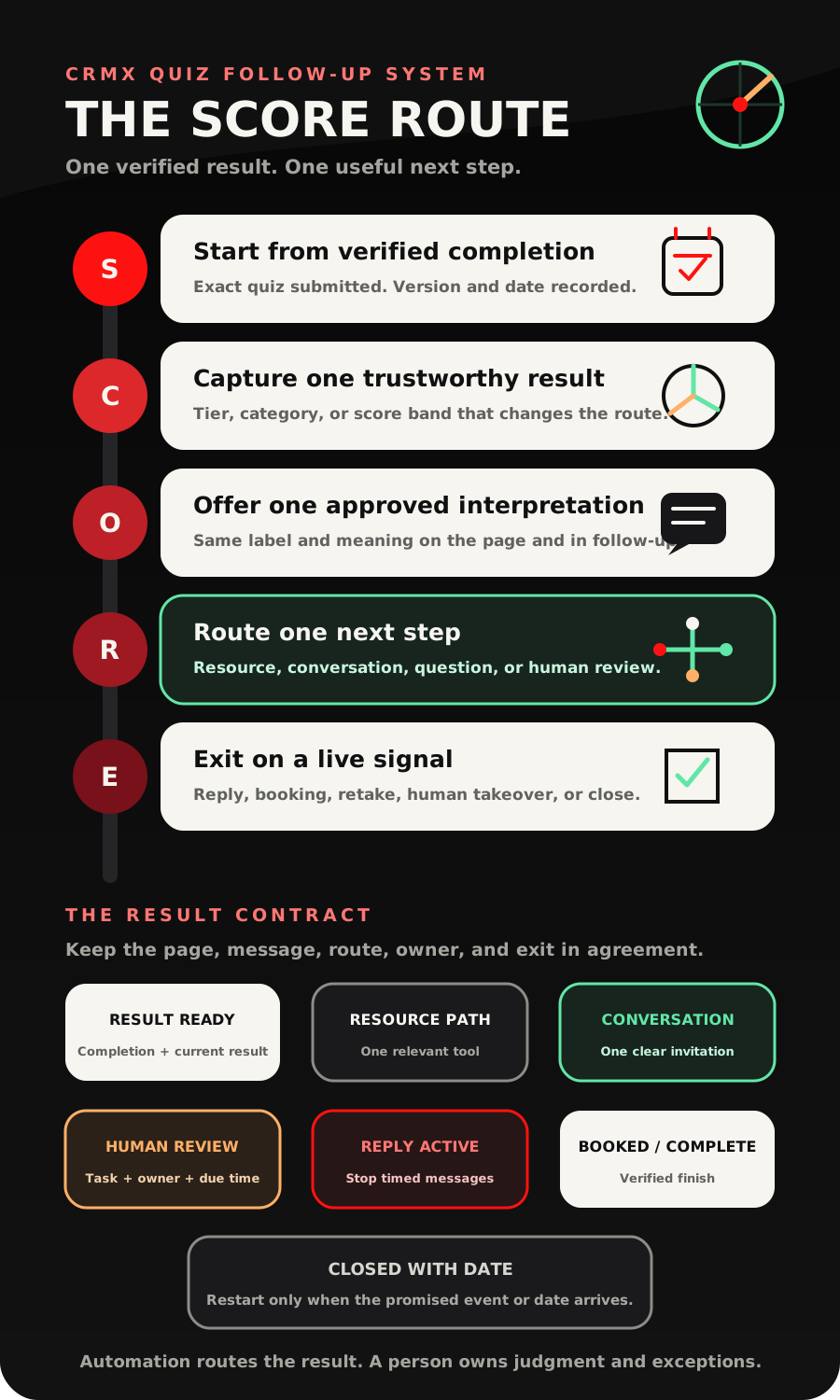
S - Start from verified completion
Use Quiz Submitted and filter it to the exact quiz.
Do not start the result workflow from:
- a page view;
- a quiz start;
- a button click;
- a partially completed assessment;
- a tag that another workflow might apply early.
The completion trigger should first record the operating state Result Ready, the quiz version, and the submission date. That gives the team one visible starting point and makes duplicate or retake tests easier to understand.
If the quiz is rebuilt, cloned, or replaced, update the workflow filter. A perfect message attached to the wrong quiz is still a broken handoff.
C - Capture one trustworthy result
Map only the result the next route needs.
The official scoring and result-page guide supports overall, category, percentage, tier, highest-category, and lowest-category outcomes. It also recommends previewing the quiz and testing edge scores.
Turn that into a simple operating rule:
Every possible submitted result must land in exactly one named route or one owned exception route.
For example, a business coach might use the lowest category from a Growth Constraint Assessment:
- Lead Flow;
- Follow-Up Consistency;
- Sales Conversation;
- Delivery Capacity.
Each label needs an approved explanation and one next-step type. If the result field is blank, unfamiliar, or outside the tested range, do not guess. Set Assessment Follow-Up State to Human Review, create a task, and send an internal alert with the quiz name, contact, result values, and record link.
The official Add Task action can create an assigned task with context and a due time. The Internal Notification action can alert selected users, roles, or teams. Use the task as the owned work. A notification alone does not prove that anyone saw or acted on it.
O - Offer one approved interpretation
The result message should answer three questions:
- What result did I receive?
- What does that result mean here?
- What should I do next?
Keep the explanation proportional to the assessment.
If the quiz measures an operating habit, say it identifies the first operating area to inspect. Do not call it a diagnosis. If it groups preferences, say it reflects the answers submitted. Do not turn it into a fixed personality judgment.
The result page and follow-up message should use the same label and explanation. If the page says Follow-Up Consistency while the text says Lead Conversion Problem, the participant has to decide which system to trust.
A useful first message looks like this:
Hi [First Name], your [Quiz Name] result is [Result Name]. In this assessment, that means [one approved explanation]. Your best next step is [resource or action]. Here is the link: [Link]. If the result does not match your situation, reply here and a person will review it with you.
That message delivers the promised value before asking for more time.
R - Route one next step
Use a small number of understandable branches.
The current If/Else workflow guide says a workflow can evaluate stored contact data and route the contact through branches. It also includes a None branch. Name that branch Human Review and give it a real owner.
Use this state-and-owner model:
| Result route | Participant-facing next step | Operating state | Owner |
|---|---|---|---|
| Guided resource | Read, watch, or complete one relevant resource | Resource Path | Content or nurture owner |
| Conversation invitation | Book the correct assessment-review call | Conversation Path | Assigned advisor |
| One clarifying question | Reply with the fact that changes the route | Reply Active after response | Named reviewer |
| Human review | Receive a short acknowledgment while a person checks the result | Human Review | Assigned reviewer |
| Later with date | Keep the result and reopen on a meaningful date | Closed with Date | Future follow-up owner |
Do not send a resource, calendar, application, sales message, and nurture sequence at the same time. The result should reduce uncertainty, not create a menu of work.
E - Exit on a live signal
Every route needs a finish.
The official Customer Replied trigger can begin a workflow when the participant replies and can be filtered to the originating workflow or relevant channel. Use a reply to move the state to Reply Active, stop incompatible timed messages, assign the conversation, and expose the question in CRMX Conversations.
Exit or redirect the current route when:
- the participant replies with a question or correction;
- the intended appointment is booked;
- a person takes ownership;
- the contact completes the assigned next step;
- the quiz is retaken and produces a new current result;
- the participant declines or requests no further contact;
- the route reaches its approved close or future review date.
The mapping documentation says a same-contact retake updates the current mapped result fields rather than creating duplicate fields. Label them as the current result. If result history matters to the business, define a separate, approved way to preserve the prior state before launching the retake path.
Build the workflow in CRMX step by step
Use three short workflows instead of one long chain that quietly owns every future state.
Workflow 1: result delivery and route
Trigger: Quiz Submitted for the exact selected quiz.
Actions:
- Record the quiz version and submitted date.
- Set Assessment Follow-Up State to Result Ready.
- Confirm the expected result field is populated.
- Use If/Else to match the current result to one approved route.
- Send the approved result message and one next step.
- Set the route state: Resource Path, Conversation Path, or Human Review.
- For Human Review, create the assigned task and internal alert.
- End. Do not keep the contact waiting inside this workflow for days.
Workflow 2: reply ownership
Trigger: Customer Replied, filtered to the result workflow or intended channel.
Actions:
- Set the state to Reply Active.
- Stop the incompatible result reminder path.
- Assign or confirm the conversation owner.
- Create an internal task when the reply needs interpretation or a promised response.
- Keep the original result and reply context visible for the owner.
Workflow 3: verified finish
Trigger: the intended appointment is booked, the approved completion field changes, or a person records the final outcome.
Actions:
- Confirm which finish event occurred.
- Set the state to Booked or Complete or Closed with Date.
- Stop the now-obsolete quiz follow-up route.
- Record the next owner and date when another action remains.
- End at a visible state.
This architecture makes the CRMX Revenue Flywheel visible: the assessment captures context, the result-aware follow-up qualifies the next step, and the human handoff protects the conversation.
Example 1: a business coach's Growth Constraint Assessment
A business coach offers a short assessment with four categories: Lead Flow, Follow-Up Consistency, Sales Conversation, and Delivery Capacity.
The quiz shows the participant's lowest category as the first constraint to inspect.
For Follow-Up Consistency, the result page and first message both explain:
Leads may be entering the business, but the next action, owner, or follow-up state is not consistently visible.
The one next step is a short follow-up workflow worksheet. After the participant receives it, CRMX asks one approved question:
Which gap shows up most often right now: slow first response, missed next steps, or no long-term follow-up?
A reply moves the contact to Reply Active and assigns the conversation. If the participant chooses to book a Follow-Up Map Review, the booked event closes the resource path.
The quiz result informs the conversation. It does not declare that the person needs coaching or qualifies for a program.
Example 2: a leadership consultant's Manager Operating Rhythm Diagnostic
A leadership consultant uses three categories: Team Clarity, Delegation, and Meeting Rhythm.
Each result has one distinct next step:
- Team Clarity: receive a one-page role-and-decision worksheet;
- Delegation: receive a delegation brief template;
- Meeting Rhythm: receive a weekly operating-cadence checklist.
If two categories tie, the quiz's approved tie behavior must still produce one tested route. If the mapped category is blank or unfamiliar, CRMX sends a neutral acknowledgment and creates a human-review task instead of choosing a resource at random.
The consultant can later invite an assessment-review conversation, but only after the participant receives the promised result and relevant resource.
Copy-ready quiz follow-up messages
Result and resource
Hi [First Name], your [Quiz Name] result is [Result Name]. In this assessment, that points to [approved interpretation]. Start with [Resource Name] here: [Link]. If the result misses important context, reply and we will review it with you.
Result and conversation
Hi [First Name], your [Quiz Name] result is [Result Name]. The most useful next step is a [Call Name] focused on [approved scope]. You can choose a time here: [Calendar Link]. If you have a question before booking, reply here.
One clarifying question
Thanks for completing [Quiz Name]. Your result is [Result Name]. Before we point you to the next resource, which matters more right now: [Choice A] or [Choice B]? Reply with either one and a person will take it from there.
Human review
Thanks for completing [Quiz Name]. We have your submission, but the result needs a quick human review before we recommend a next step. [Owner or Team] will check it. If there is context the quiz missed, reply here so it stays with your assessment.
Close with a future date
We will close this assessment path for now and keep your result as [Result Name]. We will revisit it around [Date or Event]. If your situation changes sooner, reply here and we will update the next step.
Give an AI employee a narrow role
A trained CRMX AI employee can help with the logistics around the result:
- acknowledge that the selected quiz was completed;
- repeat the approved result label and explanation;
- share the assigned resource or calendar;
- ask one approved clarifying question;
- capture a logistical question;
- prepare a concise human handoff with the quiz, result, route, and current reply.
It should not invent a diagnosis, change the configured result, make acceptance or eligibility decisions, promise an outcome, or interpret health, legal, financial, employment, psychological, protected, or similarly sensitive information.
For an application decision, use a separate human-owned process such as the CRMX SCREEN Path.
Measure the route, not just the quiz completion
The completion count tells you how many people reached the trigger. It does not tell you whether the follow-up worked as designed.
Track these operating counts by quiz and version:
- submitted results;
- results with a recognized route;
- results sent to Human Review;
- result messages attempted and delivered where the channel exposes that status;
- resource-path completions;
- conversation invitations;
- replies received;
- owned replies with a human response recorded;
- intended appointments booked;
- retakes;
- closed paths with a reason or next date.
Review exceptions first. A rising Human Review count may mean the quiz changed, the result mapping broke, an edge score was never tested, or the workflow is reading the wrong field.
Do not claim a conversion lift without a defined baseline, enough observations, and a comparable period. The immediate goal is simpler: make every completed result understandable, actionable, and owned.
Quiz follow-up launch checklist
Result design
- Confirm: the quiz serves one clear audience and decision.
- Confirm: every scored answer uses the intended value and category.
- Confirm: every possible result has one approved label.
- Confirm: every result has one plain-language explanation.
- Confirm: every result has one primary next-step type.
- Confirm: the quiz avoids unsupported diagnostic, eligibility, or outcome claims.
CRMX build
- Confirm: Quiz Submitted is filtered to the exact quiz.
- Confirm: the quiz version and submission date are recorded.
- Confirm: only decision-changing result fields are mapped.
- Confirm: If/Else contains every approved result and a Human Review branch.
- Confirm: the result page and follow-up message use the same labels.
- Confirm: Human Review creates a task with an owner and due time.
- Confirm: the internal alert contains the quiz, result, contact, and record link.
- Confirm: a real customer reply moves the state to Reply Active.
- Confirm: booking or human completion ends the obsolete route.
- Confirm: the retake rule is written and tested.
Edge-case QA
- Confirm: one submission was tested for every tier or category.
- Confirm: exact score boundaries were tested on both sides.
- Confirm: a tie was tested when categories can tie.
- Confirm: a blank, missing, or unfamiliar mapped result was tested.
- Confirm: a same-contact retake was tested.
- Confirm: a reply before the next timed message was tested.
- Confirm: a booking from the intended calendar was tested.
- Confirm: a manual human takeover was tested.
- Confirm: the wrong resource, calendar, and message cannot continue.
- Confirm: the phone and desktop result experience was verified.
Frequently asked questions
Should every high quiz score trigger a sales call?
No. A score should trigger only the next step the business has defined and tested for that result. A high score may call for a resource, one clarifying question, a conversation invitation, or human review. It is context, not proof of intent or fit.
Should I branch on a score, tier, highest category, or lowest category?
Choose the smallest result model that changes the next action. Tiers work well for ranges. Highest or lowest categories work when one area determines the next explanation or resource. Avoid mixing several models unless each one has a necessary operating purpose.
What happens when someone retakes the same quiz?
The official CRM-mapping documentation says the current mapped fields are updated with the latest result. Define whether a retake should restart the route, send it to human review, or wait for a later date. If historical comparison matters, design that record separately before launch.
Can Guy explain the quiz result?
Yes, within an approved script and knowledge boundary. Guy can repeat the configured result, explain its approved meaning, share the assigned next step, and hand a live question to a person. Guy should not create a new interpretation or make a sensitive or commercial decision.
When should I use a form or survey instead?
Use a form or survey when you only need submitted answers and a straightforward handoff. Use a quiz when scoring, categories, tiers, or a personalized result page genuinely improve the participant's next decision.
Build the route around the promise
Your quiz earned attention by promising insight. The follow-up should deliver that insight clearly, preserve the result in CRMX, and move the person toward one useful next step.
That is how an assessment becomes part of a working qualification system instead of another disconnected lead magnet.
Explore the CRMX platform, see how CRMX supports coaches and consultants, or request a live strategy demo to map your assessment, result routes, reply ownership, and stop rules.
Sources and further reading
- Official Support: Quiz Submitted workflow trigger
- Official Support: Quiz Builder guide
- Official Support: Quiz scoring, categories, and result pages
- Official Support: Map quiz results to CRM custom fields
- Official Support: If/Else workflow action
- Official Support: Customer Replied workflow trigger
- Official Support: Add Task workflow action
- Official Support: Internal Notification workflow action