
Client Offboarding for Coaches: The CRMX FINISH Path
Build a CRMX client offboarding process that verifies delivery, routes open work, separates feedback from reviews, and records the next relationship step.
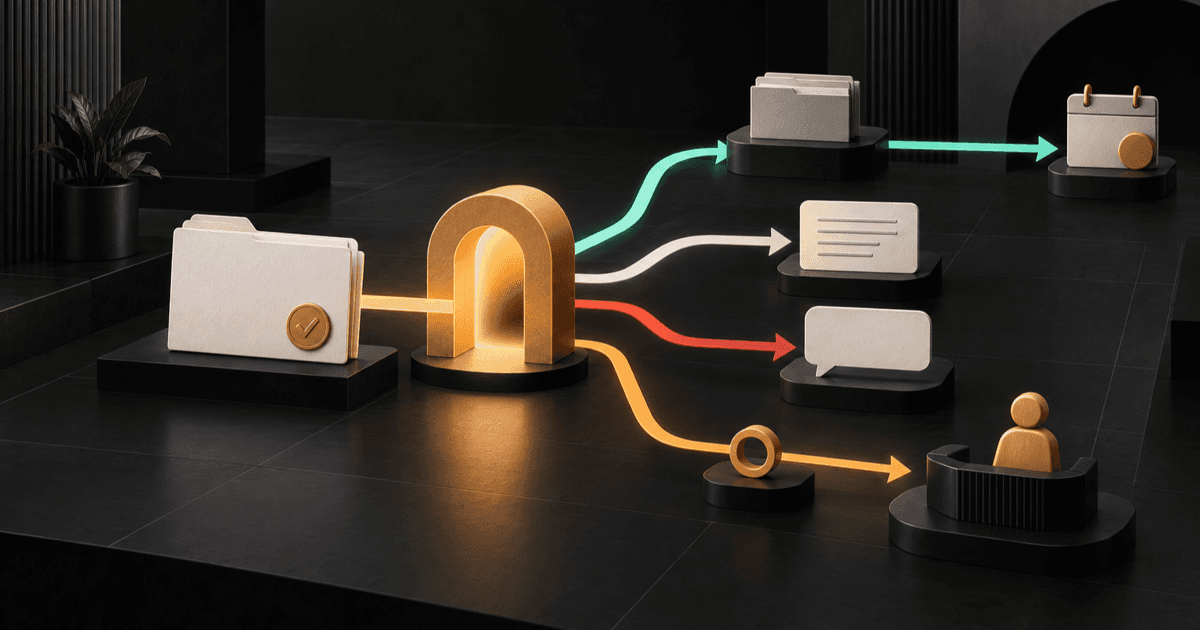
A useful client offboarding process does not end with a goodbye email.
It verifies what was delivered, exposes anything still open, gives the client an honest way to respond, separates the public review request from private feedback, and records who owns the next relationship step.
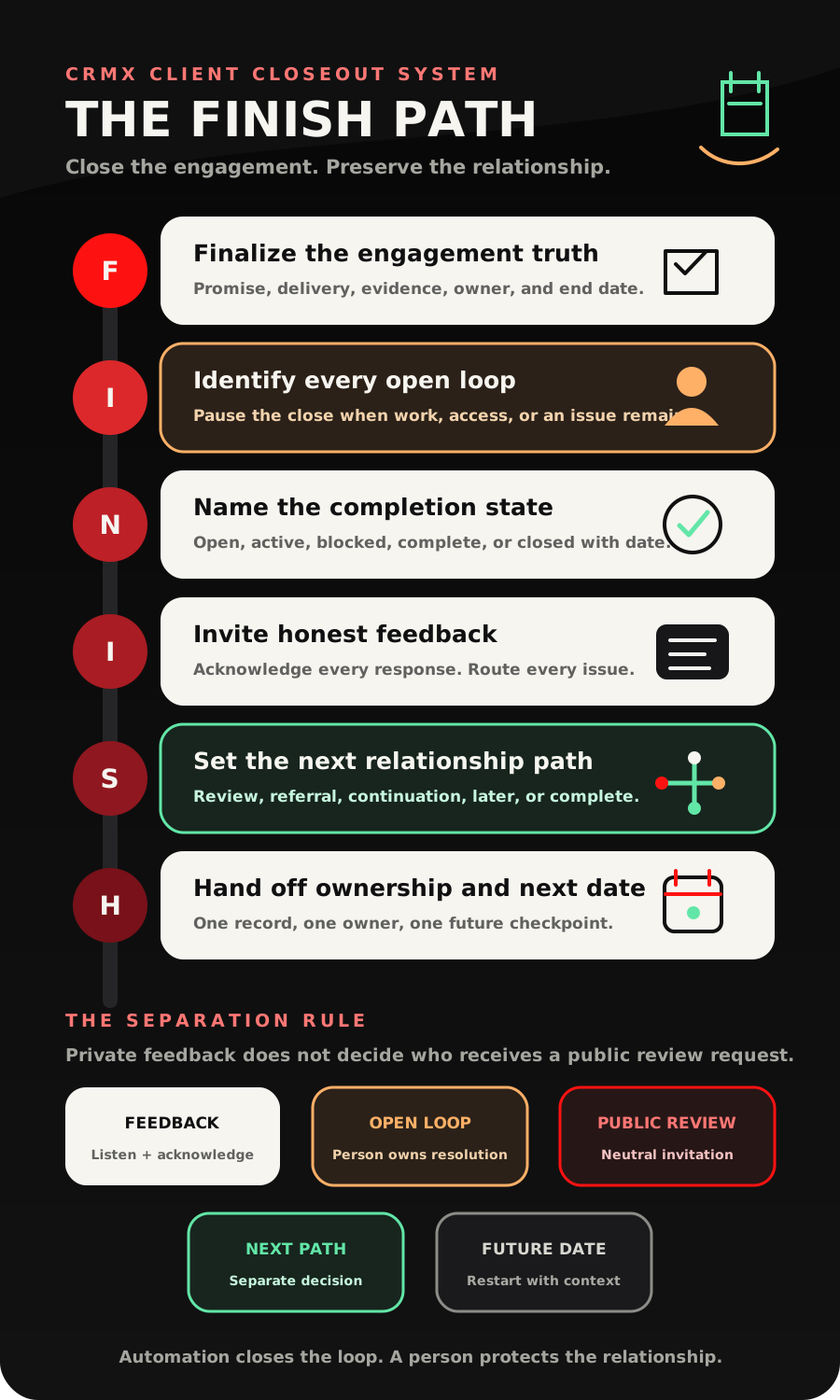
That is the CRMX FINISH Path: Finalize the engagement truth, Identify every open loop, Name the completion state, Invite honest feedback, Set the next relationship path, Hand off ownership and the next date.
Brent Attaway's Five Fortune Engines connects earned attention, structured capture, useful follow-up, repeatable conversion, post-sale care, and automation. FINISH applies those engines at the end of a coaching or consulting engagement. The closeout becomes part of the customer experience and the next round of relevant follow-up, not an administrative afterthought.
The strategy: close the engagement before you chase the next opportunity
Weak offboarding collapses several different decisions into one message:
- Is the promised work complete?
- Does the client still need help?
- May the business share a testimonial?
- Should the client receive a public review request?
- Is there a referral conversation?
- Is there another engagement to discuss?
- When should the relationship resume if none of those happen now?
Those are not one decision. They do not share the same owner, evidence, timing, or stop condition.
A workflow can remember dates, send approved messages, collect a response, create a task, notify a person, and update the record. It cannot decide that a client achieved a promised result, that an unresolved issue is closed, that a testimonial may be used publicly, or that another offer is appropriate.
The clean design is a closeout gate followed by separate paths.
The CRMX Revenue Flywheel treats post-sale care as part of growth because a completed engagement still contains attention, context, trust, and future decisions. FINISH preserves that context without turning the client into a target.
The CRMX FINISH Path
F - Finalize the engagement truth
Start with the record, not the farewell message.
Create a closeout data contract that answers:
- Which engagement is ending?
- What outcome or scope was actually promised?
- Which deliverables were completed?
- Which approvals or handoffs prove completion?
- Which items remain open?
- Who owns the closeout?
- What is the verified completion or end date?
Store engagement-specific facts on the intended opportunity or custom record when one person can have more than one engagement. Contact-level fields are useful only for facts that are truly about the person across every engagement.
Current official documentation says an Opportunity Changed workflow can react to supported stage, assignment, pipeline, and custom-field changes. That makes a verified move into Ready to Close a useful trigger when the business already manages delivery in a pipeline.
Do not let a calendar date alone declare completion. A planned end date is context. Completion still needs the evidence your business defined.
I - Identify every open loop
Before sending a review request, referral ask, continuation offer, or final archive message, check for unfinished work.
An open loop might be:
- a missing final deliverable
- client access that still needs to be transferred or removed
- an unanswered scope question
- a requested revision
- a disputed completion state
- an outstanding meeting recap
- a promised resource or recording
- a follow-up the coach, consultant, or delivery team still owes
If an open loop exists, the next action is not more automation. It is ownership.
CRMX can create the work around that ownership. The documented Add Task action can assign a named task with context and a due time, while an Internal Notification can alert a selected user, role, or team.
The task description should include the client, engagement, exact open item, source of the request, responsible owner, due time, and what evidence will close it. A notification that says only "Client needs help" creates another open loop.
Stop rule: while an issue or missing item is active, pause the generic closeout sequence. A person resolves the issue and records the next state before the remaining branches resume.
N - Name the completion state
Use visible states instead of interpreting message activity.
The minimum useful closeout states are:
- Delivery Open - promised work is still underway.
- Closeout Active - delivery appears complete and the closeout evidence is being verified.
- Client Reply Active - the client has asked a question or supplied new context.
- Issue or Missing Item - a human owns unfinished work.
- Complete - the business's required completion evidence exists.
- Next Path Active - review, referral, continuation, later follow-up, or another approved path has a separate owner.
- Closed with Date - the engagement is complete and the next relevant relationship date is recorded, even when that date is "none."
A pipeline move proves that a record changed. A task proves that work was created. A message proves that something was sent. None of those facts alone proves that delivery is complete or that a person acted.
The state should change only when the required evidence changes.
I - Invite honest feedback
After completion is verified, ask a short question the client can answer honestly.
A useful closeout survey might ask:
- What was most useful about the engagement?
- Is anything still unclear, incomplete, or waiting on us?
- What should we know before we close the engagement?
Official workflow documentation says a selected Survey Submitted event can start a workflow. Use that event to acknowledge the submission, record the feedback state, and create a human-owned task when the client raises an issue.
Do not treat a submitted survey as proof of satisfaction or success. It proves only that a response was recorded.
Every live message also changes the path. The Customer Replied trigger can route a reply by supported filters such as tag, originating workflow, phrase, intent type, or channel. When a reply arrives, stop the generic timer and move the conversation into a human-owned response state.
Keep private feedback and public reviews separate
Private feedback helps the business learn and resolve issues. A public review is the client's account of a genuine experience. Those are different jobs.
CRMX includes a documented Review Request workflow action. If Google Maps is the destination, Google's current policy says reviews should reflect a genuine experience and be genuine and unbiased. It also prohibits paying or incentivizing people to post, revise, or remove reviews. See the Google Maps User Generated Content Policy.
Use this operating rule:
- acknowledge every private feedback response
- route every issue to a person
- base review eligibility on a genuine completed experience and the platform's applicable rules
- do not use the private satisfaction score to invite only favorable clients to leave a public review
- do not offer a discount, gift, credit, or other benefit in exchange for a review
The public request can stay neutral: ask for an honest review, make the link easy to use, and let the client decide what to say.
S - Set the next relationship path
Completion should create one next state, not five simultaneous asks.
Choose among separate paths:
- Complete only: thank the client and close the engagement.
- Review: send one neutral review invitation under the business's approved rules.
- Referral: a person decides whether and when a referral conversation is appropriate.
- Continuation: move the decision into a dedicated renewal or next-engagement process.
- Later: store a real date and context for a future check-in.
- No further contact: record the stop state and respect it.
Do not send a review request, referral ask, testimonial request, next offer, and newsletter invitation in one closeout message. Even when every action is permitted, the pileup makes the client feel like the relationship ended with a list of favors.
If continuation is the real next question, use a dedicated client renewal workflow. If a testimonial is submitted later, use a separate testimonial follow-up process with its own permission and publishing decisions.
H - Hand off ownership and the next date
The final closeout record should answer:
- What is the verified state?
- Who owns the next action?
- What is the next action?
- When is it due?
- What event stops or changes it?
- Where will the team see the result?
For a future alumni check-in, continuation review, or other relevant event, a verified date can begin a later workflow. Current documentation says a Custom Date Reminder can start before, on, or after a supported date field.
An empty date is not a strategy. If the relationship should continue, record a real next date and the reason for it. If there should be no further contact, record that honestly too.
The closeout state-and-owner decision aid
Delivery Open
- What must be true: Promised work remains active.
- CRMX action: Keep the engagement in delivery and suppress closeout asks.
- Human owner: Delivery owner confirms the remaining scope and date.
Closeout Active
- What must be true: Delivery appears complete and evidence is being checked.
- CRMX action: Create the closeout brief and send the approved confirmation path.
- Human owner: Closeout owner verifies the record.
Client Reply Active
- What must be true: A live reply or question exists.
- CRMX action: Stop generic reminders, preserve the conversation, and route context.
- Human owner: Assigned person answers and records the result.
Issue or Missing Item
- What must be true: The client or team identified unfinished work.
- CRMX action: Create the exact task and internal alert; pause downstream asks.
- Human owner: Named person resolves the item and provides proof.
Complete
- What must be true: The business's required completion evidence exists.
- CRMX action: Close the delivery state and open only the approved next branch.
- Human owner: Authorized person confirms completion.
Next Path Active
- What must be true: One separate next relationship path was selected.
- CRMX action: Enroll only in that path and suppress competing asks.
- Human owner: Path owner handles judgment and exceptions.
Closed with Date
- What must be true: The engagement and immediate follow-up are complete.
- CRMX action: Record the next date or the no-further-contact state.
- Human owner: Relationship owner reviews the future event when it arrives.
Build the client offboarding process in CRMX
1. Define the completion evidence
Write the evidence required for each engagement type. Examples include approved deliverables, a completed final session, a signed handoff, transferred access, or a human-confirmed completion note.
Do not create one vague Done checkbox for every offer.
2. Create the closeout fields
Use the smallest useful set:
- Engagement name or ID
- Promised outcome or scope summary
- Planned end date
- Verified completion date
- Completion evidence
- Open-loop state
- Closeout owner
- Feedback state
- Public review request state
- Next relationship path
- Next relationship date
- Stop reason
3. Build the completion-entry workflow
Use the verified stage or field change that begins closeout. Create the closeout task, notify the owner, and generate the administrative message only after the intended record is in context.
4. Build reply and issue exits first
Before adding reminders, define what happens when the client replies, reports an issue, asks a scope question, or supplies missing information.
Every exit needs an owner, due time, and state update.
5. Build the short feedback path
Use one concise survey on a CRMX website or funnel, or send the approved link through the conversation channel already used for the engagement. Acknowledge the submission and route any issue without judging the client response automatically.
6. Build review, referral, continuation, and later as separate paths
Each path needs its own trigger, eligibility rule, message, owner, stop condition, and measurement. The review path must not depend on a positive private-feedback score.
7. Give every future path a date or event
Connect the next date to a calendar, custom date, pipeline state, or verified behavioral event. Do not leave "follow up later" as a note with no owner.
8. Report states, not sends
Your CRMX reporting should show where engagements are stuck:
- ready to close
- issue active
- complete
- feedback received
- review request sent
- next path active
- future date recorded
- closed with no next contact
Message volume is activity. A verified state is operating truth.
What Guy should and should not handle
A trained CRMX AI employee can make the closeout easier without pretending to own the relationship.
Guy may:
- prepare a closeout brief from verified fields
- send an approved administrative reminder
- acknowledge a survey or reply
- collect a missing date, document, or scheduling preference
- share an approved feedback, review, or calendar link
- summarize the known context for a human handoff
- alert the owner when a client asks for help
Guy should not:
- declare that the promised outcome was achieved
- decide that an issue is resolved
- interpret sensitive coaching or consulting feedback
- promise a refund, revision, credit, or future deliverable
- authorize public use of a testimonial
- choose clients for a public review request based on sentiment
- decide that a referral or next offer is appropriate
- mark the engagement complete without the required evidence
The AI employee can move context. The human owner makes the consequential decision.
Two concrete use cases
Use case 1: a 12-week business coaching engagement
The final coaching session occurs, but the engagement is not automatically complete.
The closeout owner verifies that the final action plan, session recording, and agreed resources were delivered. CRMX opens the closeout path and sends one message asking the client to confirm receipt and share anything still waiting on the team.
The client replies that the action plan is complete but one promised template is missing. The generic path stops. CRMX creates a task for the coach, alerts the closeout owner, and moves the record to Issue or Missing Item.
After the template is delivered and a person verifies completion, the engagement moves to Complete. The client receives a short private feedback invitation. Under the business's approved review rules, a neutral public review request is handled as a separate branch rather than being filtered by the private score. An alumni check-in receives a real future date.
Use case 2: an operations-consulting implementation
The consultant has delivered the workflow map, SOP library, training session, and final handoff recording.
The closeout brief lists every deliverable, the client's approval status, remaining system access, and the internal owner for the final transfer. The client confirms the deliverables but asks one implementation question in the conversation inbox.
The reply pauses the closeout sequence and creates a human-owned task. Once the consultant answers and records the completion evidence, CRMX closes the delivery pipeline stage.
The next relationship path is not assumed. A human decides whether the client should enter a support retainer conversation, receive a later implementation review date, or simply close with no additional offer.
Copy-ready client offboarding messages
Completion check
We are preparing the final closeout for [engagement]. Here is what we have marked complete: [deliverable summary]. Is anything still unclear, missing, or waiting on us before we close the engagement?
Automated acknowledgment
Thanks for the update. I recorded your response and sent the context to [owner]. You will hear from us by [time or date].
Human issue handoff
I reviewed your note about [open item]. I own the next step. I will [specific action] by [date], and I will confirm here when it is complete.
Neutral public review request
Thank you for working with us. If you would like to share an honest review of your experience, you can do that here: [review link].
Future relationship date
We have closed the current engagement and recorded [date] as the next useful time to reconnect about [context]. If that timing changes, reply here and we will update it.
Measure completion without inventing success
Useful closeout measures include:
- engagements entering closeout with complete delivery evidence
- open loops by owner and age
- client replies waiting for a human response
- time from
Closeout Activeto a verified state - engagements closed with a defined next path
- future relationship dates that have a named reason and owner
- review requests sent under the approved neutral rule
- closeout workflows that failed, stalled, or required manual correction
Do not report a survey submission as satisfaction. Do not report a review request as a review. Do not report a scheduled follow-up as a renewed relationship. Do not report a closed opportunity as proof of a client outcome.
The FINISH launch checklist
- Define completion evidence for each engagement type.
- Keep engagement-specific facts on the correct record.
- Create the seven closeout states and name an owner for each.
- Build the open-loop and customer-reply exits before reminders.
- Put the exact client, engagement, issue, owner, and due time in every internal handoff.
- Keep private feedback independent from public review eligibility.
- Use a neutral review request and no review incentive.
- Separate review, referral, testimonial, continuation, and later paths.
- Give every future relationship path a real date or event.
- Suppress generic messages when a person takes ownership.
- Test complete, issue, reply, no-response, next-path, and no-further-contact branches.
- Reopen the contact, opportunity, task, conversation, and workflow history to verify what was actually saved.
- Confirm dashboards report verified states rather than sends or enrollments.
Frequently asked questions
When should client offboarding begin?
Begin when the engagement appears ready to close and the required completion evidence can be checked. A planned end date can prompt review, but it should not declare completion by itself.
Should the feedback survey come before the public review request?
They can occur in sequence, but the private answer should not be used to invite only favorable clients to leave a public review. Treat issue resolution and the neutral public-review invitation as separate operating paths.
Can Guy summarize the client engagement?
Guy can prepare an administrative closeout brief from verified CRMX fields and approved sources. A person should confirm scope, completion, sensitive feedback, promises, and the next commercial decision.
Does offboarding replace renewal?
No. Offboarding closes the current engagement truthfully. Renewal or continuation is one optional next path with its own decision process, owner, and evidence.
Should every completed client receive a referral ask?
No automatic rule fits every relationship. A referral request should be a separate, deliberate decision based on the business's approved process, the client's experience, timing, and the nature of the relationship.
What happens when the client never responds?
Follow the documented no-response rule. Verify the business's completion evidence, send only the approved reminders, record the unresolved state if needed, and never turn silence into proof of satisfaction, permission, or agreement.
Make the ending useful
A client relationship should not disappear when the final session ends or the last deliverable is sent.
Build one truthful closeout gate. Expose unfinished work. Keep feedback and public reviews separate. Give every next path an owner, a stop condition, and a real date.
That is how the Raving Fan and Automation engines work together: the system handles the repeatable rhythm, while people protect the experience and make the decisions that matter.
Explore CRMX for coaches and consultants, see how the complete Revenue Flywheel connects delivery to future growth, or audition Guy live to hear how a trained AI employee can collect context and hand a real client conversation to the right person.
Sources and further reading
- Official Support: Opportunity Changed workflow trigger
- Official Support: Survey Submitted workflow trigger
- Official Support: Customer Replied workflow trigger
- Official Support: Add Task workflow action
- Official Support: Internal Notification workflow action
- Official Support: Review Request workflow action
- Google Maps User Generated Content Policy
- Official Support: Custom Date Reminder workflow trigger